Learn how to pay for 3M INTEL Pocket WiFi in Japan, including U20, MR1 and WiMAX deposits, convenience-store payments, and refund conditions.
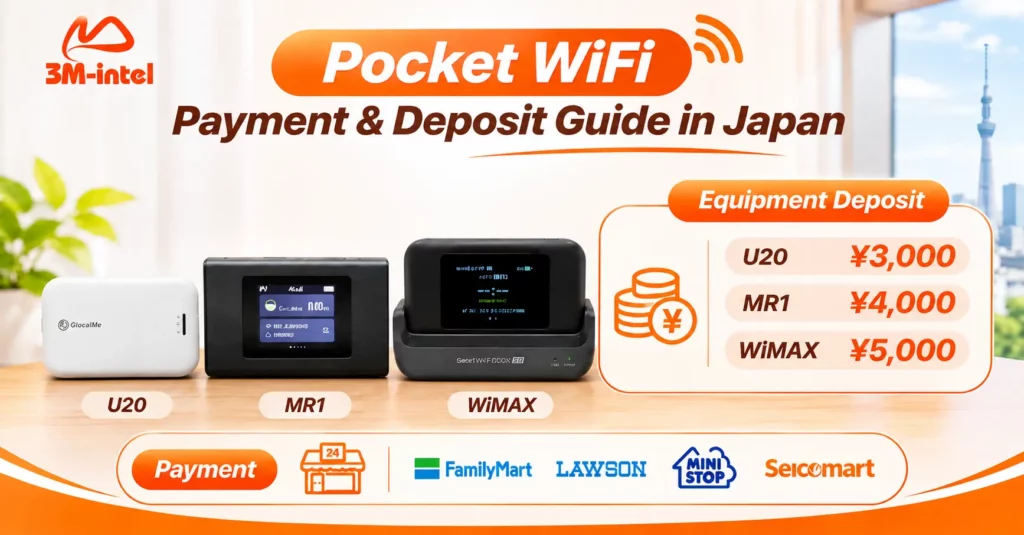
When renting Pocket WiFi from 3M INTEL in Japan, customers need to understand two separate payments: the monthly rental fee and the equipment deposit. The published deposit amounts are ¥3,000 for U20, ¥4,000 for MR1, and ¥5,000 for WiMAX. Deposits may be refunded when customers end their rental, return the device and accessories, and meet the applicable return conditions.
For convenience-store payments, 3M INTEL provides payment codes that customers can use at supported stores, including FamilyMart, Lawson, Mini Stop, and Seicomart.
3M INTEL (3Mintel株式会社) offers Pocket WiFi rental services for people living, studying, working, and traveling in Japan. This guide explains the payment process, equipment deposits, monthly billing, and how to request a deposit refund when returning your Pocket WiFi.
1. What Fees Do You Pay When Renting Pocket WiFi?
When registering for Pocket WiFi, customers should distinguish between three possible types of charges.
| Payment Type | What It Covers |
| Monthly Rental Fee | The cost of using your selected Pocket WiFi data plan |
| Equipment Deposit | A refundable amount held during the rental period, subject to device return conditions |
| Additional Fees, If Applicable | Charges related to specific payment methods, delivery arrangements, or service requests |
Monthly rental fees depend on the selected data plan, device, and applicable pricing policy at the time of registration.
An equipment deposit is not a device purchase fee and is not automatically used to cover the final month’s rental charges.
Customers must follow the service termination and equipment return procedures separately.
Before making a payment, ask 3M INTEL to confirm the total amount due, billing schedule, and any applicable additional fees.
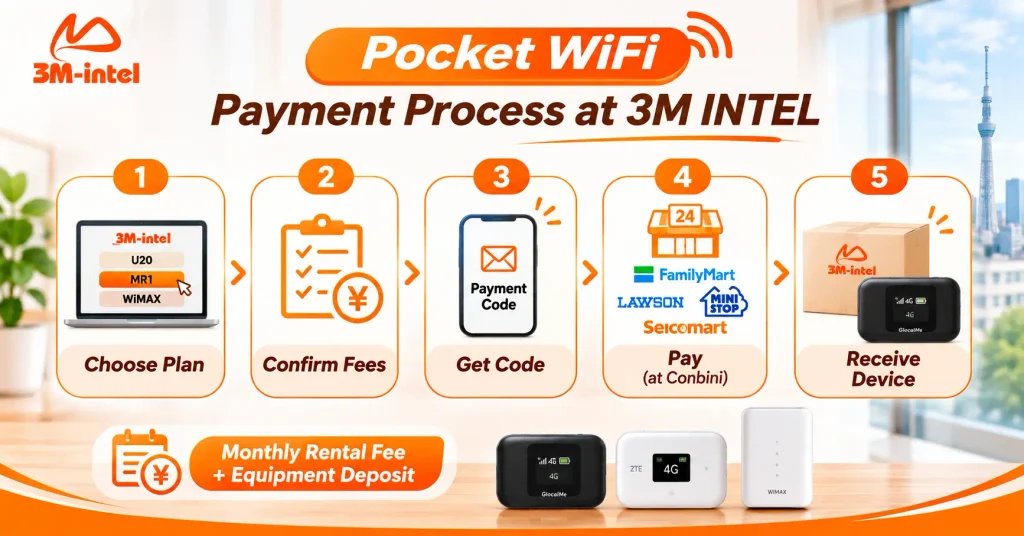
The five-step 3M INTEL Pocket WiFi payment process: choose a plan, confirm fees, receive a payment code, pay at a convenience store, and receive your device.
2. Equipment Deposits for U20, MR1, and WiMAX
3M INTEL currently publishes the following equipment deposit amounts:
| Pocket WiFi Device | Equipment Deposit | Refund Conditions |
| GlocalMe U20 | ¥3,000 | Refundable subject to equipment return conditions |
| MR1 | ¥4,000 | Refundable subject to equipment return conditions |
| WiMAX | ¥5,000 | Refundable subject to equipment return conditions |
Customers can choose a device based on their internet usage needs, coverage availability, and compatible data plans.
A higher equipment deposit does not necessarily mean the device will provide faster internet speeds in every location.
You can explore the available models on the 3M INTEL Pocket WiFi page.
Before receiving your device, confirm its model, deposit amount, and the accessories included in the rental package.
Keeping a clear record of these items can help prevent misunderstandings when returning the equipment.
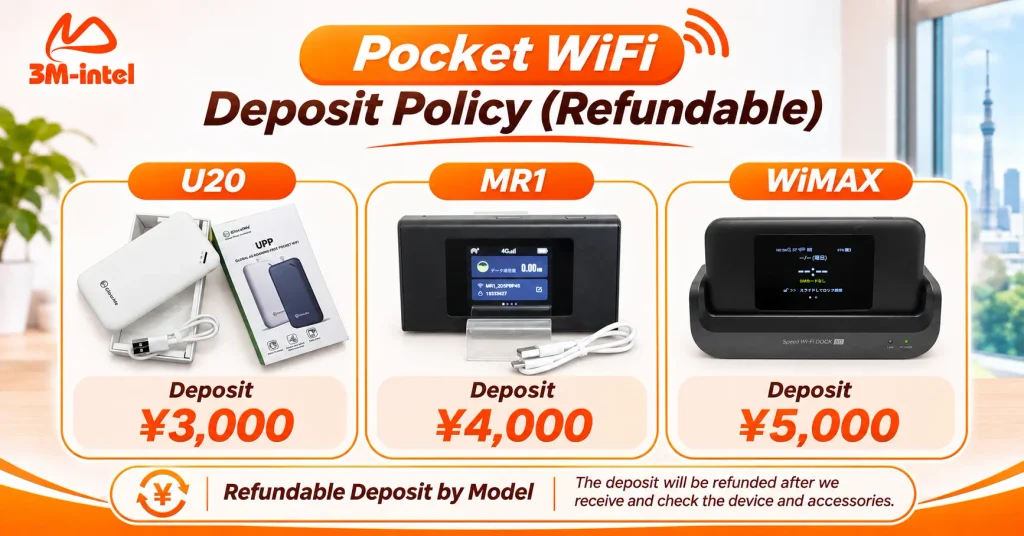
3M INTEL Pocket WiFi equipment deposits are ¥3,000 for U20, ¥4,000 for MR1, and ¥5,000 for WiMAX. Deposits are refundable subject to equipment and accessory inspection and applicable return conditions.
3. How to Pay for Pocket WiFi at 3M INTEL
The Pocket WiFi payment process generally involves confirming your service, completing payment, and receiving the equipment.
Step 1: Choose a Device and Confirm the Total Cost
Customers provide their expected usage needs, rental period, location, and number of devices requiring internet access.
3M INTEL then confirms the details of the rental:
- Pocket WiFi model: U20, MR1, or WiMAX.
- Data plan and monthly rental fee.
- Required equipment deposit.
- Next billing date.
- Included accessories and return conditions.
Do not complete payment until you understand how the equipment deposit and monthly rental fee are calculated separately.
Step 2: Receive Your Payment Code From 3M INTEL
Once your registration details have been confirmed, 3M INTEL provides a payment code and instructions.
Customers can use the code at supported convenience stores in Japan, including:
- FamilyMart
- Lawson
- Mini Stop
- Seicomart
Convenience-store payments can be particularly useful for customers who prefer paying in person using the instructions provided by their service provider.
Step 3: Complete Payment and Receive Your Pocket WiFi
Follow the instructions associated with your payment code and complete the payment.
Keep your receipt or transaction confirmation in case you need to verify the payment later.
After payment confirmation, 3M INTEL arranges equipment delivery or handover according to the agreed method.
When receiving your Pocket WiFi, check the condition of the device and any included accessories, such as the charging cable, power adapter, or device stand.
Step 4: Pay Your Monthly Pocket WiFi Rental Fee
3M INTEL Pocket WiFi services use a monthly billing system.
Customers should confirm the payment due date and available payment methods during registration.
In addition to convenience-store payments, previous 3M INTEL guidance has mentioned bank transfers and payments in Vietnamese dong.
However, the current availability and conditions of these payment methods should be confirmed for your specific rental agreement.
If you would prefer to pay upon delivery using Daibiki (cash on delivery), ask whether this option is available and whether any additional charges apply.
4. How to Request a Pocket WiFi Deposit Refund
Your Pocket WiFi equipment deposit may be refunded when the rental ends and the device is returned in accordance with 3M INTEL’s equipment return policy.
The deposit is not automatically forfeited when you register for the service.
The return and refund process generally involves four steps.
Step 1: Request Service Termination
Contact 3M INTEL to confirm your intended service termination date, final billing period, and equipment return instructions.
Do not assume that stopping payment automatically terminates the rental.
Step 2: Prepare the Device and Accessories
Check the original equipment handover list and prepare the items that need to be returned.
Depending on the device, these may include:
- Pocket WiFi device.
- USB charging cable.
- Power adapter.
- Other accessories included in the rental package.
Make sure the equipment is in the condition required by the applicable return policy.
Step 3: Return the Equipment as Instructed
Follow the return or shipping method confirmed by 3M INTEL.
Do not send the equipment to an unverified address.
If you need to ship the device, ask whether shipping charges apply and whether a tracking number is required.
Step 4: Equipment Inspection and Deposit Refund
After receiving the returned equipment, 3M INTEL checks the device and accessories against the applicable return conditions.
If the requirements are met, the deposit is processed for a refund according to the relevant policy.
If the device is lost, damaged, or returned with missing accessories, the refund may be affected by the equipment’s condition and the terms of the rental agreement.
Before returning your device, confirm the expected refund processing period, refund method, and how any equipment-related issues will be handled.
5. Frequently Asked Questions About Pocket WiFi Payments and Deposits
Can My Equipment Deposit Be Used to Pay the Monthly Rental Fee?
You should not assume so.
The equipment deposit is separate from the monthly service fee and is handled through the device return and refund process.
Any arrangement to offset the deposit against other charges must be confirmed by 3M INTEL.
Can I Pay for Pocket WiFi at a Convenience Store in Japan?
Yes.
3M INTEL supports payment by code at participating convenience stores, including FamilyMart, Lawson, Mini Stop, and Seicomart, according to the payment instructions provided.
When Is the Monthly Pocket WiFi Payment Due?
The payment schedule is confirmed during registration.
Customers should follow the current billing information associated with their rental rather than assuming every customer has the same payment due date.
Will I Receive My Full Deposit Back When I Return the Device?
A deposit may be refunded when the equipment and accessories meet the applicable return requirements.
The final refund amount should be confirmed after the returned equipment has been received and inspected.
6. Contact 3M INTEL to Confirm Your Payment and Deposit
When renting Pocket WiFi in Japan, choosing the right data plan is only one part of the process.
It is equally important to understand your monthly rental charges, equipment deposit, payment method, and refund conditions before registering.
3M INTEL publishes specific equipment deposits for U20, MR1, and WiMAX and provides payment instructions for supported convenience stores in Japan.
Before registering, share your estimated rental period, internet usage needs, and delivery address so the support team can confirm the applicable charges.
Contact 3M INTEL
- Website: https://3mintel.jp/
- Pocket WiFi Services: https://3mintel.jp/pocket-wifi/
- FAQ: https://3mintel.jp/support/faq/
- Contact: https://3mintel.jp/contact/
- Email: 3mintel.japan@gmail.com
3M INTEL – Clear Equipment Deposits, Transparent Payment Options, and a Simpler Pocket WiFi Rental Experience in Japan.