Learn how to register for Pocket WiFi with 3M INTEL in Japan, including plan selection, payment, device deposits, delivery, and setup.
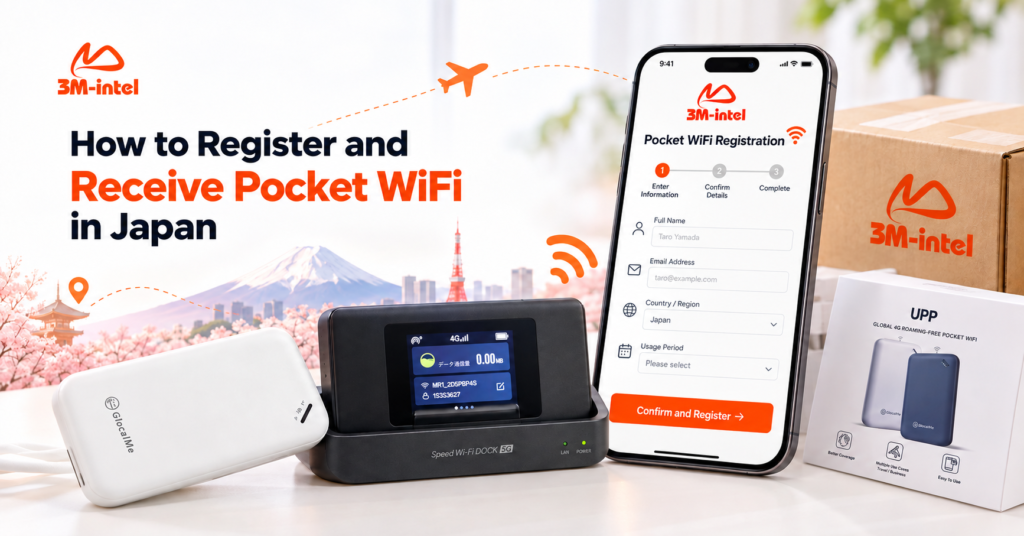
To register for and receive Pocket WiFi in Japan through 3M INTEL, customers need to choose a suitable Pocket WiFi plan, provide their registration details, confirm the monthly charges and device deposit, complete payment, and then receive and connect their router. The process does not require fixed-line installation at home, making it suitable for people who need flexible internet access while living, studying, or working in Japan.
At 3M INTEL (3Mintel株式会社), customers can explore 100GB monthly and Full Data Pocket WiFi options while receiving guidance on registration requirements, payment methods, device delivery, and setup.
However, customers should clearly distinguish between monthly internet service charges and device deposits before registering. These payments serve different purposes and are subject to different conditions.
This guide explains each step of registering for Pocket WiFi with 3M INTEL, from preparing the required information to receiving the device, connecting to the internet, and managing the monthly service.
1. What Do You Need to Prepare Before Registering for Pocket WiFi in Japan?
Before registering for Pocket WiFi, customers should identify their internet needs and prepare basic information to make the consultation and order-processing stages more straightforward.
1.1. Personal Information and Delivery Address
According to 3M INTEL’s registration guidance, customers should prepare:
- Full name of the applicant.
- Contact information.
- Address in Japan.
- Expected service period.
- Number of users and devices that need to connect.
- Estimated monthly internet data requirements.
If the Pocket WiFi device will be delivered, customers should provide a complete Japanese address, including the postal code, prefecture, street address, building name, and apartment or room number where applicable.
An accurate delivery address is particularly important, as missing recipient information or apartment numbers may cause delivery problems.
1.2. Do You Need Identification Documents to Register for Pocket WiFi?
Identification requirements depend on the selected service plan.
According to 3M INTEL’s product materials, certain Pocket WiFi options feature simplified registration without requiring customers to sign a long-term paper contract.
However, this does not mean that every Pocket WiFi product is exempt from identity verification or rental conditions.
Customers should confirm the required documents, registration information, and applicable conditions with the consultation team.
If personal identification documents are requested, customers should only submit them through official channels confirmed by 3M INTEL.
1.3. Does Pocket WiFi Require Home Installation?
No. Pocket WiFi is a portable internet device that operates through supported mobile networks.
Unlike fiber-optic home internet, customers do not need to wait for a technician to install a physical connection at their residence.
After receiving the router and completing any necessary activation and setup steps, customers can access the internet in locations with suitable network coverage.
This makes Pocket WiFi worth considering for newcomers to Japan, international students, frequent travelers, and customers waiting for fixed-line internet installation.
2. How to Register for and Receive Pocket WiFi From 3M INTEL
According to 3M INTEL’s published procedures, Pocket WiFi registration begins with choosing a device and service plan, followed by confirming charges, making payment, and receiving the equipment.
Below is a detailed guide to each step.
Step 1: Contact 3M INTEL for Pocket WiFi Consultation
Customers contact 3M INTEL through an official communication channel and provide information about their internet needs.
During the consultation, the team may ask:
- How long do you need internet access?
- Will you mainly use the internet at home or while traveling?
- How many smartphones, laptops, or tablets need to connect?
- Do you mainly use the internet for messaging, online classes, video streaming, or work?
- Do you need a large monthly data allowance?
This information helps identify a suitable plan and router.
For example: An international student who mainly uses the internet for research, messaging, and moderate video streaming may consider the 100GB plan. Meanwhile, someone who frequently attends video meetings, downloads large files, and connects several devices may want to explore Full Data.
The selection should be based on actual data needs rather than the plan name alone.
Step 2: Choose a 100GB or Full Data Pocket WiFi Plan
According to its product portfolio, 3M INTEL provides two main Pocket WiFi options.
100GB Pocket WiFi Plan
This plan provides a total of 100GB within a monthly billing cycle. According to the product information, the allowance is not divided into fixed daily limits.
It may suit customers with defined data requirements who can monitor their usage.
Full Data Pocket WiFi Plan
This option is intended for customers with higher data consumption, including frequent video streaming, online work, or multiple connected devices.
However, Full Data does not guarantee maximum internet speeds under all circumstances. Customers should review the applicable Fair Usage Policy (FUP) and speed conditions.
After selecting a plan, 3M INTEL confirms the available Pocket WiFi model and relevant service conditions.
Step 3: Confirm Monthly Charges, Device Deposit, and Rental Conditions
This is an important step before making any payment.
According to its official procedures, 3M INTEL provides information about:
- Monthly internet service charges.
- Device deposit.
- Service plan conditions.
- Pocket WiFi router model.
- Equipment and accessories included.
- Cancellation and equipment return requirements.
Customers should understand that a device deposit is separate from the monthly internet service fee.
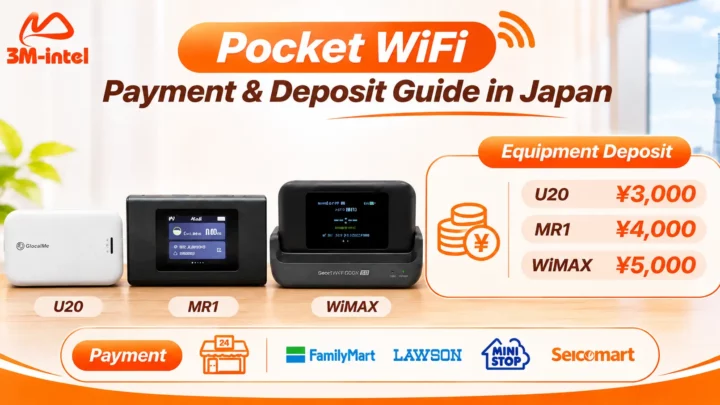
According to the published policy, reference deposit amounts for certain devices include:
| Pocket WiFi Model | Device Deposit |
| U20 | ¥3,000 |
| MR1 | ¥4,000 |
| WiMAX | ¥5,000 |
The deposit is held during the service period and may be refunded after the service ends, provided the equipment and accessories are returned according to the applicable conditions.
Initial Payment Calculation:
Initial Payment = First Billing Period Service Fee + Device Deposit + Any Applicable Additional Charges
Customers should request a breakdown of each payment before confirming their order.
Step 4: Receive a Payment Code From 3M INTEL
After customers confirm their registration, 3M INTEL generates a payment code and provides instructions for transactions using convenience store payments.
Customers should check:
- Amount to be paid.
- Payment code.
- Payment deadline.
- Supported convenience store.
- Instructions for using the payment code.
Customers should not make payments based on instructions from accounts that have not been confirmed as official 3M INTEL communication channels.
Step 5: Pay at a Convenience Store in Japan
One of the payment methods described in 3M INTEL’s Pocket WiFi guidance is convenience store payment using a payment code.
Supported convenience store chains listed in its service information include:
- FamilyMart.
- Lawson.
- Mini Stop.
- Seicomart.
The basic process is as follows:
- Receive the payment code and instructions from 3M INTEL.
- Visit a supported convenience store.
- Enter or scan the required payment information according to the store’s instructions.
- Follow the steps displayed by the store’s payment system.
- Complete the transaction according to the store’s procedure.
The exact process may vary depending on the convenience store chain and payment code type.
After paying, customers should keep their receipt or proof of payment for future reference.
Other payment methods may be available depending on the service and order. Customers should confirm the applicable method before making payment.
Step 6: 3M INTEL Confirms Payment and Processes the Order
Once payment has been confirmed, 3M INTEL continues processing the registration and arranges equipment delivery or collection according to the agreed method.
For orders requiring delivery, customers should verify:
- Recipient’s name.
- Delivery address in Japan.
- Registered Pocket WiFi model.
- Number of devices.
- Contact information for delivery.
If the recipient or delivery address changes, customers should notify the consultation team as early as possible.
Step 7: Receive Your Pocket WiFi Device in Japan
After the order has been processed, customers receive their router through the confirmed delivery or handover method.
What Should You Check When Receiving Pocket WiFi?
First, compare the actual device with the confirmed registration details.
| Item to Check | Purpose |
| Router Model | Ensure the correct product has been received |
| External Condition | Record scratches or damage, if any |
| Screen and Power Button | Check the initial device condition |
| Charging Cable and Accessories | Confirm all included items are present |
| Power and Startup Function | Check whether the device turns on |
| SSID and Password Instructions | Prepare for internet connection |
If the router is the wrong model, accessories are missing, or the equipment appears damaged, customers should contact 3M INTEL promptly for guidance.
Recommendation: Take photos of the router and accessories when the package arrives and keep the equipment handover details. This can be useful if technical assistance or equipment returns are needed later.
Step 8: Connect Your Pocket WiFi and Start Using the Internet
After receiving the router, customers can follow these basic connection steps.
Step 1 – Turn On Pocket WiFi
Press the power button according to the instructions for your router model. If the device does not turn on, check the battery level or charging connection.
Step 2 – Find the WiFi Network Name
On your smartphone or laptop, open WiFi settings and locate the router’s network name (SSID).
Step 3 – Enter the WiFi Password
Use the WiFi password provided or displayed on the device.
Step 4 – Test the Internet Connection
After connecting, open a website or an application that requires internet access to confirm the connection is working.
Step 5 – Connect Additional Devices if Needed
If your router model supports it, you can connect additional laptops or tablets using the same WiFi network name and password.
The maximum number of connected devices depends on the specific Pocket WiFi model.
If your phone shows that it is connected to WiFi but cannot access the internet, check the mobile network signal and service status before changing router settings.
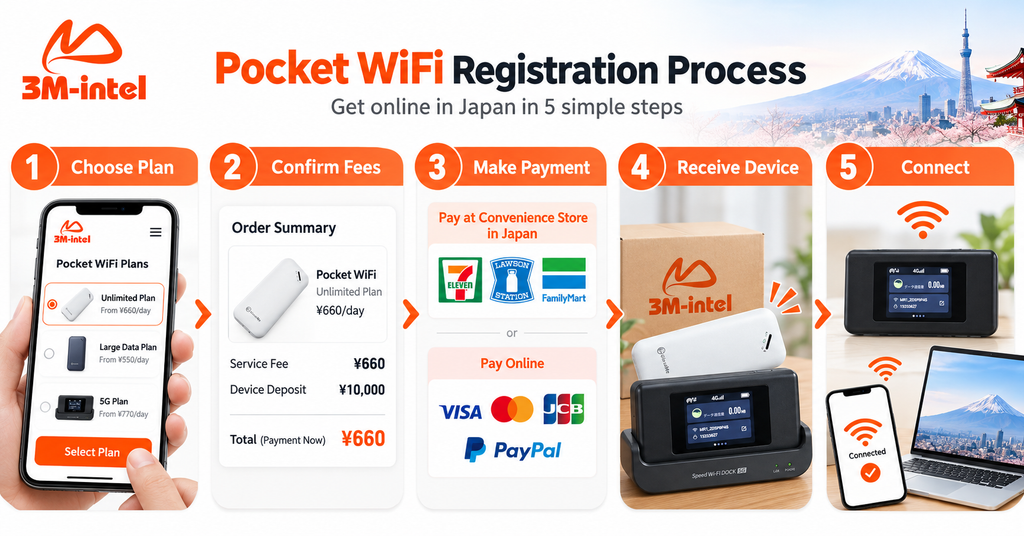
The 3M INTEL Pocket WiFi registration process includes five steps: choose a plan, confirm fees, make payment, receive the device, and connect to the internet.
3. How Long Does Pocket WiFi Delivery Take in Japan?
Pocket WiFi delivery times depend on registration processing, payment confirmation, equipment availability, the delivery address, and the selected handover method.
According to the internal procedures referenced in 3M INTEL’s content materials, some SIM and Pocket WiFi orders have an estimated delivery timeframe of approximately 2–3 days.
However, this is not a guaranteed delivery period for all orders and does not mean that every customer will receive the equipment within 2–3 days after submitting a request.
Factors That May Affect Delivery Time
Delivery Address: Orders sent to remote areas or addresses with incomplete information may require additional processing time.
Payment Timing: Order processing depends on when the payment is confirmed.
Equipment Availability: The selected router model must be available for preparation and delivery.
Shipping Provider: Delivery schedules, weather conditions, and other logistical factors may affect arrival times.
To plan ahead, particularly when newly arriving in Japan or preparing to move, customers should register before the date they need internet access and confirm the estimated delivery schedule with 3M INTEL.
4. Common Problems After Receiving Pocket WiFi
After receiving a router, some customers may experience issues such as a missing WiFi network, no internet connection, or slow speeds.
Below are basic troubleshooting steps.
4.1. Pocket WiFi Will Not Turn On
Check the battery, power supply, and charging cable.
If the router still does not work, do not attempt to disassemble it or modify internal components. Contact the support team for guidance.
4.2. Cannot Find the WiFi Network Name
Make sure the router is powered on and its WiFi function is active.
If necessary, restart the device according to the instructions for the specific model.
Also, confirm that WiFi is enabled on your smartphone or laptop.
4.3. Connected to WiFi but No Internet Access
In this situation, customers can check:
- The router’s mobile network signal.
- Service activation status.
- Data allowance and plan conditions.
- Current location and mobile network coverage.
- Any error messages displayed on the router screen.
If the cause is unclear, provide the router model and photos of any error messages to 3M INTEL for troubleshooting assistance.
4.4. Pocket WiFi Connection Is Slow
Internet speeds may be affected by network coverage, congestion, the number of connected devices, or data usage conditions.
Customers can try moving to an area with better signal reception, reducing the number of connected devices, and checking the service status.
Avoid restoring factory settings without guidance, as this may change the router’s configuration.
5. What Should You Keep in Mind After Receiving Pocket WiFi?
Pocket WiFi is not simply a device that customers receive and use once. For monthly services, customers also need to monitor payment schedules and take responsibility for equipment care.
5.1. Pay Monthly Charges on Time
According to 3M INTEL’s service procedures, Pocket WiFi uses monthly billing.
Customers should keep track of the billing cycle confirmed during registration to avoid service interruptions.
If the payment period is unclear or no payment instructions have been received, contact support before the due date.
5.2. Take Care of the Router and Accessories
Customers should:
- Avoid leaving the router in high temperatures or direct sunlight.
- Use a suitable charging source.
- Protect the device from impacts and water exposure.
- Keep all accessories included with the equipment.
- Monitor unusual behavior during operation.
Proper equipment care helps maintain usability and may also affect return eligibility when the service ends.
5.3. Do Not Transfer the Equipment Without Authorization
Pocket WiFi is provided under the rental or lending conditions confirmed during registration.
Customers should not sell, transfer, or dispose of the equipment as if they owned it outright unless permitted under the service agreement.
5.4. Contact Support if Problems Occur
If a router is lost, damaged, or does not function normally, contact 3M INTEL for guidance.
When requesting support, provide the product name, router model, problem description, and any necessary order information for verification.
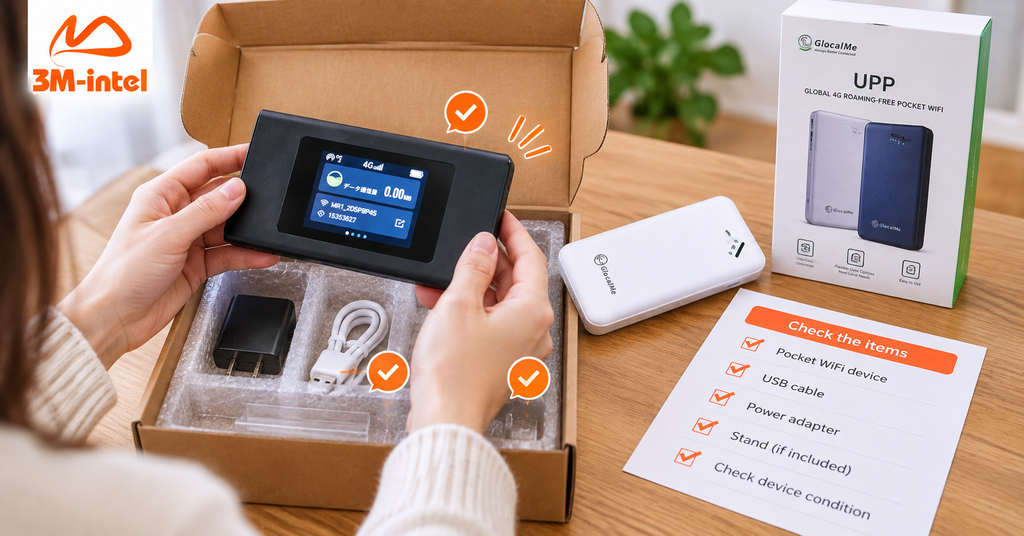
Customers check their Pocket WiFi device and accessories after delivery to ensure everything is included before using 3M INTEL services in Japan.
6. How to Return Pocket WiFi and Receive Your Deposit Refund
An important point when registering for Pocket WiFi in Japan is that rented or borrowed routers generally need to be returned when the service ends.
According to 3M INTEL’s policy, customers must follow the equipment return procedure and include the required accessories.
Step 1: Contact 3M INTEL to End the Service
Customers should contact 3M INTEL to confirm the cancellation conditions, the date on which billing ends, and any remaining obligations.
Step 2: Check the Equipment Before Returning It
Depending on the model, the equipment package may include the Pocket WiFi router, charging cable, power adapter, and other accessories.
Customers should compare these items with the original handover list.
Step 3: Return the Equipment According to Instructions
Follow the return method, address, and deadline confirmed by the support team.
Keep shipping records or proof of handover for reference.
Step 4: Equipment Inspection and Deposit Refund
After the equipment has been received and inspected according to the applicable conditions, the deposit will be processed for a refund if the return requirements are met.
Customers should confirm the refund timeframe, refund method, and circumstances that could affect the amount refunded.
Important: Do not assume that the entire deposit will be refunded if the router is lost, damaged, or returned without required accessories.
7. Why Register for Pocket WiFi With 3M INTEL?
For international customers living or working in Japan, a suitable Pocket WiFi service should not only offer an appropriate data allowance but also provide an understandable registration process and clearly explained conditions.
Guidance on Choosing a Plan and Router
3M INTEL offers 100GB and Full Data Pocket WiFi options for customers to consider based on their internet usage needs.
The consultation team can use information about the number of connected devices, expected service period, usage locations, and online activities to help customers select a suitable option.
Published Deposit Information by Router Model
3M INTEL provides device deposit information for U20, MR1, and WiMAX on its website, while also explaining the difference between equipment deposits and monthly internet service charges.
This gives customers a reference for checking costs before registering.
Convenience Store Payment Guidance
For eligible transactions, customers can use payment codes provided by 3M INTEL at designated convenience stores.
Instructions are provided to help customers understand what they need before making payment.
No Fixed-Line Home Internet Installation
Pocket WiFi can be used without installing a physical internet line at home, offering more flexibility for customers who have recently moved to Japan or need temporary internet access.
Connection and Troubleshooting Guidance
The 3M INTEL website provides setup information and guidance for common connectivity issues.
Customers can contact support when they need assistance checking their router or internet connection.
Equipment Return and Deposit Refund Policy
3M INTEL publishes procedures for returning Pocket WiFi devices and processing deposits when customers end their service, subject to applicable return conditions.
Specific requirements should be confirmed for the router model and policy in effect at registration.
8. Frequently Asked Questions About Pocket WiFi Registration and Delivery in Japan
Do I Need to Visit a Physical Store to Register for 3M INTEL Pocket WiFi?
3M INTEL’s procedures support remote consultation, order confirmation, and payment guidance, followed by arranged delivery or equipment handover.
Customers should confirm the receiving method available for their order.
Can I Use Pocket WiFi Immediately After Receiving It?
Once the router has been activated and properly configured, customers can turn it on, select the SSID, enter the password, and test internet access.
If the connection does not work, check the service status and contact support.
Is a Deposit Required for 3M INTEL Pocket WiFi?
Certain router models require a deposit.
According to the published policy, the reference amounts are ¥3,000 for U20, ¥4,000 for MR1, and ¥5,000 for WiMAX.
The actual deposit should be confirmed for the supplied router model.
Can I Pay at FamilyMart or Lawson?
Yes, for supported transactions.
3M INTEL provides a payment code and instructions for the relevant convenience store.
Can Pocket WiFi Be Delivered to an Address in Japan?
3M INTEL has procedures for arranging equipment delivery or handover after registration and payment confirmation.
Delivery coverage, estimated arrival times, and related conditions should be confirmed for each order.
What Should I Do if Delivery Takes Longer Than Expected?
Contact 3M INTEL with your order information to check the processing or shipping status.
Estimated delivery times should not be treated as guaranteed deadlines.
Can Pocket WiFi Connect Multiple Devices?
Yes. Pocket WiFi shares internet access with smartphones, laptops, and tablets through WiFi.
The maximum number of connected devices depends on the router model and usage conditions.
Can I Receive My Deposit Back When I Stop Using Pocket WiFi?
Deposits are processed for refunds after the service ends and the router and required accessories are returned according to the applicable conditions.
Customers should confirm the deposit refund policy and equipment return deadline before registering.
9. Register for and Receive Pocket WiFi in Japan With 3M INTEL
Registering for Pocket WiFi in Japan becomes more straightforward when customers understand each step: choosing a plan, confirming costs, making payment, receiving the router, and connecting to the internet.
With its 100GB and Full Data Pocket WiFi options, 3M INTEL aims to help customers select a suitable service based on their actual needs while providing information about deposits, rental conditions, and setup before registration is completed.
If you need portable WiFi for studying, working, connecting multiple devices, or staying online while waiting for fixed-line internet installation, contact 3M INTEL to check the available plans and equipment.
Contact 3M INTEL for consultation and Pocket WiFi registration in Japan.
Contact Information
- Website: https://3mintel.jp/
- Email: 3mintel.japan@gmail.com
- WiFi Services: https://3mintel.jp/
- Registration and Payment Information: https://3mintel.jp/
3M INTEL – Flexible Connectivity, Clear Registration Procedures, and Support Throughout Your Internet Experience in Japan.