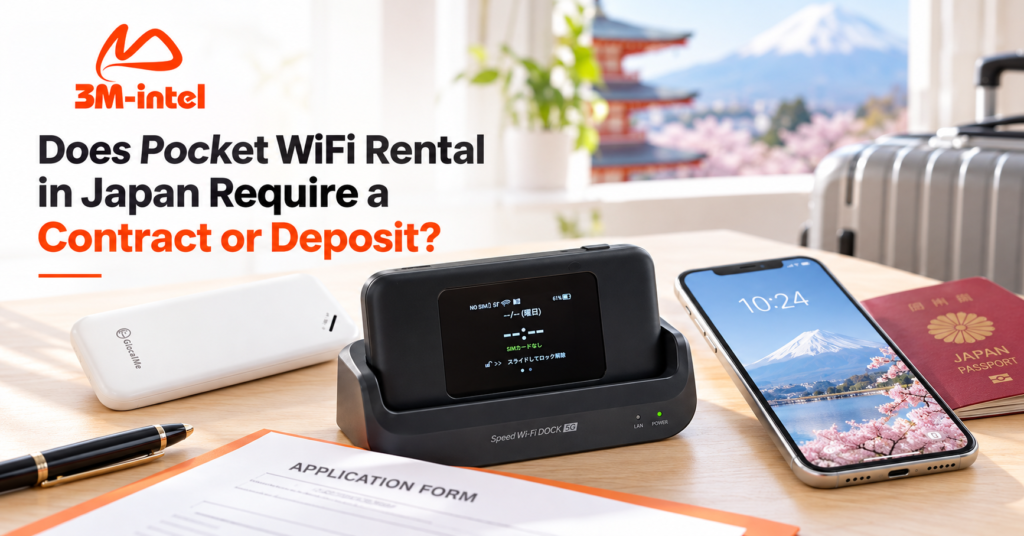
Does Pocket WiFi rental in Japan require a contract or deposit? Learn about rental fees, refundable deposits, device returns, and 3M INTEL policies.
Renting Pocket WiFi in Japan may not require a long-term contract, but a device deposit may still apply. At 3M INTEL, certain Pocket WiFi options offer simplified registration, monthly payments, and deposits that vary depending on the router model. The deposit may be refunded when customers end the service and return the device and accessories according to the applicable conditions.
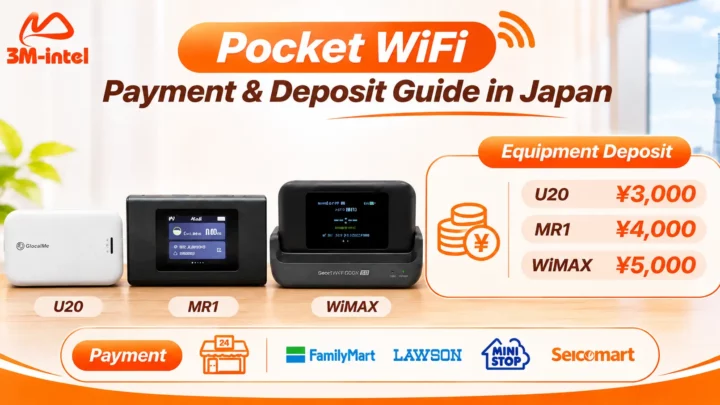
According to the published policies of 3M INTEL (3Mintel株式会社), reference device deposits include ¥3,000 for the U20, ¥4,000 for the MR1, and ¥5,000 for the WiMAX. These deposits are held for the equipment and are separate from monthly internet service charges.
However, before registering, customers should confirm the service conditions, rental period, payment obligations, and deposit refund procedures for their selected product.
This guide explains Pocket WiFi rental policies in Japan, the differences between rental fees and deposits, and what customers should prepare to make registration, usage, and equipment returns more straightforward.
1. Does Pocket WiFi Rental in Japan Require a Contract?
Pocket WiFi is a portable internet device that allows smartphones, laptops, and tablets to connect to the internet through a private WiFi network.
Unlike fiber-optic home internet, Pocket WiFi does not require a fixed-line installation or construction work at your residence.
However, rental contract requirements depend on the provider and service plan.
1.1. What Does “No Long-Term Contract” Mean?
Some Pocket WiFi services allow customers to register without committing to an extended period, such as 12 or 24 months.
This can be particularly useful for people who are unsure how long they will stay in Japan or only need internet access for a specific period.
According to its product consultation materials, 3M INTEL offers certain Pocket WiFi options with simplified registration and flexible usage conditions.
However, customers should distinguish between three different concepts:
- No long-term contract: You may not need to commit to an extended fixed service period.
- No paper contract: Registration may be completed without signing traditional paper documents.
- No service conditions: This is entirely different and should never be assumed when renting equipment.
Even if no paper contract is signed, customers must still comply with the agreed service conditions, particularly regarding payments, equipment care, and returns.
1.2. Does 3M INTEL Pocket WiFi Require a Long-Term Contract?
According to its product information, 3M INTEL offers Pocket WiFi solutions for customers seeking flexible internet connectivity in Japan, including eligible options with simplified registration and no long-term contract requirement.
However, minimum usage periods, billing cycles, cancellation conditions, and equipment return obligations should be confirmed for each plan.
Before registering, customers should ask:
- Does the Pocket WiFi plan have a minimum usage period?
- How far in advance must I notify 3M INTEL before ending the service?
- Will any additional fees apply when I cancel?
- How should I return the router and accessories?
Confirming these details helps customers understand their obligations, even when there is no paper contract or long-term commitment.
2. Is a Deposit Required for Pocket WiFi Rental in Japan?
A deposit may be required, depending on the provider, router model, and rental conditions.
For Pocket WiFi services offered through rental or lending arrangements, providers may request a deposit to manage the equipment during the customer’s usage period.
Paying a deposit does not mean the customer has purchased the router.
2.1. What Is a Pocket WiFi Device Deposit?
A device deposit is an amount customers pay when receiving rented or borrowed equipment.
It is generally held throughout the service period and may be refunded when the service ends, provided the applicable return requirements are met.
For example, if a Pocket WiFi device requires a ¥3,000 deposit, that amount should be considered separately from the monthly internet plan fee.
Customers should not assume that deposits will automatically be deducted from monthly charges or refunded unconditionally.
2.2. Pocket WiFi Deposit Amounts at 3M INTEL
According to 3M INTEL’s published service information, reference deposit amounts vary by router model:
| Pocket WiFi Model | Device Deposit |
| U20 | ¥3,000 |
| MR1 | ¥4,000 |
| WiMAX | ¥5,000 |
Important information:
- Deposits are determined by the router model, not automatically by the data plan.
- A device deposit is separate from the internet service fee.
- The deposit may be refunded after the service ends if the equipment and accessories are returned according to the applicable conditions.
- The supplied router model and actual deposit amount should be confirmed when registering.
If customers choose a 100GB or Full Data Pocket WiFi plan, 3M INTEL will need to confirm the corresponding router model before providing the total initial payment amount.
2.3. Do I Need to Purchase a Pocket WiFi Router?
Not necessarily.
Depending on the product, 3M INTEL provides Pocket WiFi devices through rental or lending arrangements.
This allows customers to use a router during their registered service period without purchasing it outright.
However, customers are still responsible for using, maintaining, and returning the equipment according to the service conditions.
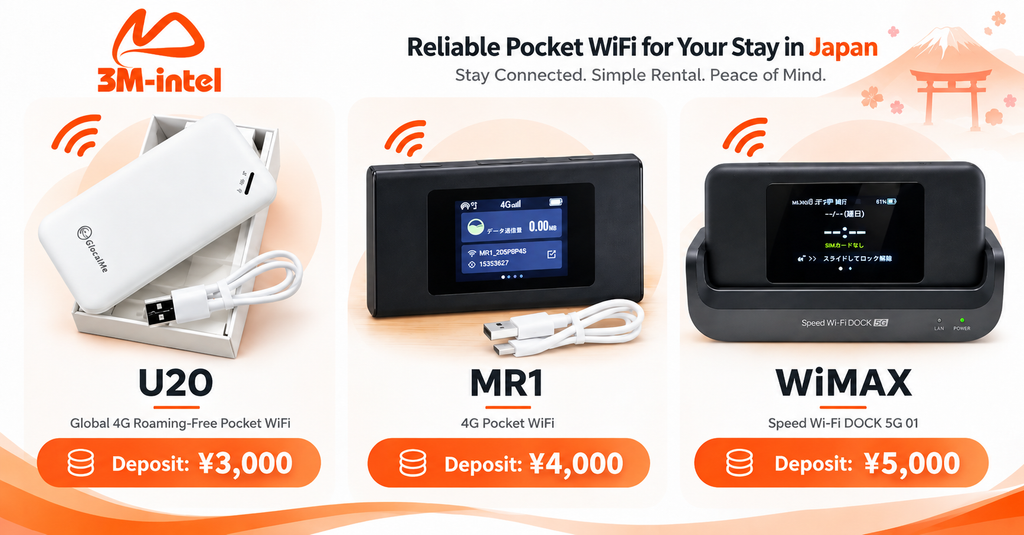
3M INTEL offers Pocket WiFi rentals with device-specific deposits: ¥3,000 for U20, ¥4,000 for MR1, and ¥5,000 for WiMAX, subject to the equipment return and deposit refund policy.
3. Understanding Device Deposits, Monthly Fees, and Other Costs
One common source of confusion when renting Pocket WiFi in Japan is the difference between internet service charges and equipment deposits.
The following table explains the main categories.
| Cost Category | Purpose | Is It Refundable? |
| Monthly WiFi Service Fee | Payment for the selected internet plan | Subject to service terms; not automatically refundable |
| Device Deposit | Held as security for equipment return | Potentially refundable if return requirements are met |
| Delivery Fee | Shipping the equipment | Depends on the applicable policy |
| Payment Surcharge | May apply to certain payment methods | Depends on transaction conditions |
| Lost or Damaged Equipment Charges | Covers applicable equipment-related obligations | Determined by the confirmed policy |
Example: How to Calculate Your Initial Payment
Suppose a customer registers for a Pocket WiFi router with a ¥3,000 deposit.
The initial amount can be calculated as follows:
Initial Payment = First Billing Period Service Fee + ¥3,000 Device Deposit + Any Applicable Additional Charges
This example does not assume a specific monthly service fee because actual prices depend on the selected Pocket WiFi plan and current policies.
Before registering, customers should request an itemized breakdown rather than relying only on a total amount without understanding each charge.
4. Can You Get Your Pocket WiFi Deposit Back After Cancellation?
Yes, provided that you meet 3M INTEL’s applicable equipment return requirements.
This is one of the most important points to understand before renting Pocket WiFi.
4.1. Requirements for Receiving a Deposit Refund
According to the published service policy, deposits are processed for refunds after customers end the service and return the device and required accessories.
Customers should:
- Complete the cancellation procedure according to the provided instructions.
- Return the same router model supplied during registration.
- Include all required accessories.
- Meet the applicable equipment condition requirements.
- Follow the confirmed return deadline and shipping procedure.
Refund eligibility depends on the equipment inspection results and the conditions agreed upon at the time of rental.
4.2. What Must Be Returned When the Service Ends?
Depending on the router model, the equipment package may include:
- Pocket WiFi router.
- Charging cable.
- Power adapter.
- Other accessories provided with the device.
Not every router model includes the same accessories.
Therefore, customers should check and keep a record of the equipment and accessories immediately after receiving their order.
This creates a useful reference when the device is returned.
4.3. What Happens if the Pocket WiFi Router Is Lost or Damaged?
If a router is lost, damaged, or returned with missing accessories, the deposit refund may be affected under the rental conditions.
Customers should not assume they will receive a full refund if the equipment does not meet the required return standards.
Before using the service, it is advisable to confirm:
- What types of damage are considered chargeable?
- Will missing accessories reduce the refundable deposit?
- Are additional charges applicable if the router is lost?
- Which official communication channel should be used to report equipment problems?
3M INTEL should provide these conditions before handing over the equipment to help avoid misunderstandings or disputes.
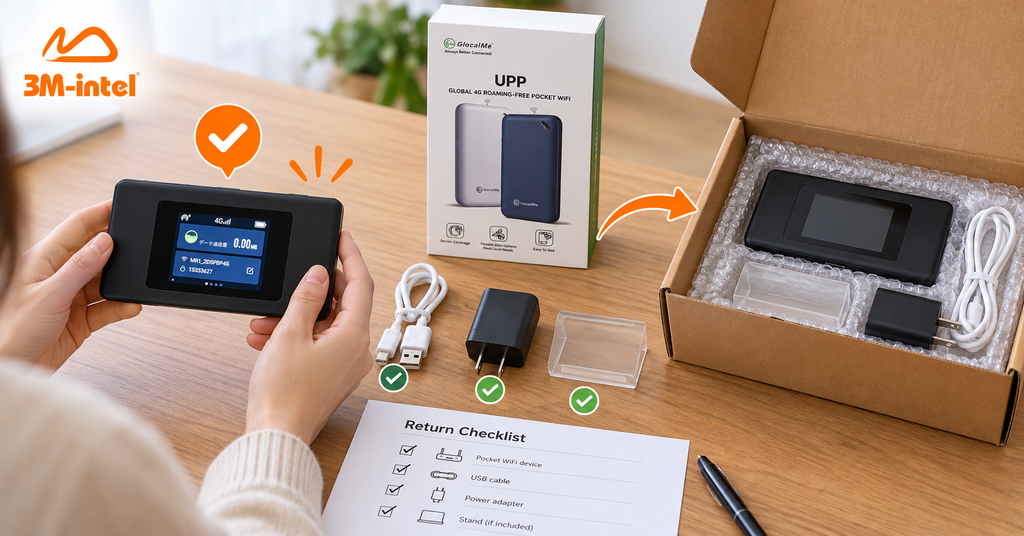
Customers check their Pocket WiFi device and accessories before returning the equipment to 3M INTEL in Japan.
5. Are There Cancellation Fees for Pocket WiFi Rental in Japan?
Pocket WiFi cancellation fees depend on the terms of each service plan.
Certain 3M INTEL products are described as offering flexible cancellation conditions, but customers should confirm exactly which policies apply before registering.
It is important to distinguish between:
Cancellation Fee: A charge that may apply when ending a service under its terms.
Outstanding Service Charges: Payments remaining for the applicable usage or billing period.
Equipment Return Obligations: The responsibility to return rented or borrowed routers and accessories.
Equipment-Related Charges: Costs that may arise if equipment is not returned, is lost, or is damaged under the confirmed rental conditions.
Even if a plan has no cancellation fee, other outstanding obligations may still apply.
Therefore, rather than asking only, “Is cancellation free?”, customers should request confirmation of all amounts and obligations that must be settled when ending the service.
6. How to Register and Rent Pocket WiFi at 3M INTEL
According to its service guidance, customers can register for Pocket WiFi at 3M INTEL through the following steps.
Step 1: Contact 3M INTEL and Choose a WiFi Plan
Customers provide information about their internet needs, including intended usage period, location, number of connected devices, and estimated data consumption.
3M INTEL explains the available 100GB or Full Data Pocket WiFi options and checks which router model is suitable.
Step 2: Confirm Pricing and Device Deposit
Before registering, customers should receive information about:
- Selected internet plan.
- Monthly service charge.
- Pocket WiFi router model.
- Device deposit amount.
- Payment methods.
- Included accessories.
- Cancellation and equipment return conditions.
This step helps customers understand the payment obligations before completing registration.
Step 3: Receive Payment Instructions
For transactions that support convenience store payments, 3M INTEL provides the necessary payment code and instructions.
Designated stores listed in its service information include FamilyMart, Lawson, Mini Stop, and Seicomart.
Customers should verify the amount, payment code, and deadline before completing the transaction.
Step 4: Complete Registration and Receive Your Router
After the necessary procedures have been completed, 3M INTEL arranges equipment delivery or collection according to the confirmed order details.
Upon receiving the package, customers should inspect the router, accessories, and initial device condition.
Step 5: Connect and Start Using Pocket WiFi
Customers can follow these basic steps:
- Turn on the Pocket WiFi router.
- Find the WiFi network name (SSID).
- Enter the password.
- Connect a smartphone, laptop, or tablet.
- Check that internet access is working.
Pocket WiFi does not require a fixed-line installation at your residence.
Step 6: Pay Monthly Service Charges
While the service remains active, customers make payments according to their confirmed billing schedule.
To avoid internet interruptions, customers should keep track of their payment deadlines and review payment notifications from 3M INTEL.
Step 7: Cancel the Service and Return the Equipment
When the service is no longer needed, customers should contact 3M INTEL to receive instructions on cancellation and equipment returns.
Step 8: Equipment Inspection and Deposit Refund
After the router and required accessories have been received and inspected, the deposit will be processed for a refund if the applicable return requirements are satisfied.
The refund timeframe and payment method should be confirmed according to the current process.
7. Why Are Clear Rental and Deposit Policies Important?
For international residents in Japan, registering for internet services can sometimes be challenging because of language differences, payment procedures, and contract requirements.
Knowing the costs and rental obligations in advance can help avoid situations such as:
- Confusing a device deposit with the monthly internet fee.
- Not knowing that equipment must be returned when the service ends.
- Returning the router without required accessories.
- Uncertainty about cancellation conditions or outstanding charges.
- Not knowing whom to contact when equipment problems occur.
A transparent rental policy should help customers understand how much they must pay, the conditions under which they may use the device, and what they need to do when ending the service.
3M INTEL publishes information about registration, device deposits, rental equipment, and return procedures on its official website, giving customers a reference before choosing a service.
This helps customers understand the policy and verify details when communicating with the consultation team.
8. What Should You Check Before Renting Pocket WiFi From 3M INTEL?
To make the registration process clearer, customers should review the following information.
| What to Confirm | Why It Matters |
| Pocket WiFi Model | Identifies the actual equipment being provided |
| 100GB or Full Data Plan | Clarifies data allowances and service conditions |
| Monthly Service Charge | Helps customers plan their budget |
| Device Deposit | Identifies the upfront equipment-related payment |
| Minimum Usage Period | Prevents misunderstandings about service commitments |
| Cancellation and Outstanding Charges | Clarifies obligations when ending the service |
| Included Accessories | Provides a reference for equipment returns |
| Return Deadline | Helps avoid problems when returning the device |
| Refund Conditions and Timeframe | Explains how and when a deposit may be refunded |
| Official Support Channel | Provides a contact point for service-related issues |
Customers should keep their registration confirmations, payment receipts, and equipment return instructions throughout the rental period.
9. Why Consider Pocket WiFi Services From 3M INTEL?
3M INTEL provides SIM, eSIM, Pocket WiFi, and fixed-line internet connectivity solutions in Japan.
For Pocket WiFi services, 3M INTEL aims to help customers select a suitable internet plan while understanding the equipment rental conditions before registration.
Two Pocket WiFi Data Options
Customers can explore 100GB monthly and Full Data plans depending on their internet usage needs.
The 100GB plan may suit customers who mainly use the internet for studying, everyday work, and moderate entertainment.
Customers who need larger amounts of data may consider Full Data and review the applicable usage conditions.
Published Device Deposit Information
3M INTEL provides reference device deposit amounts for U20, MR1, and WiMAX routers on its website.
This helps customers distinguish device deposits from monthly service charges and provides a reference when discussing registration.
Guidance on Rental and Equipment Return Procedures
The 3M INTEL website explains the process from choosing a device and completing payment to receiving Pocket WiFi, returning equipment, and requesting a deposit refund.
Customers can review these steps before registering rather than relying solely on private conversations.
Setup and Troubleshooting Support
In addition to providing Pocket WiFi devices, 3M INTEL offers guidance on equipment setup, WiFi connection, and troubleshooting common issues.
If customers experience connection failures, frozen devices, or slow internet speeds, they can contact the support team for assistance.
10. Frequently Asked Questions About Pocket WiFi Rental in Japan
Does 3M INTEL Pocket WiFi Require a Long-Term Contract?
According to its product materials, some 3M INTEL Pocket WiFi options feature simplified registration and do not require a long-term contract.
However, customers should confirm the minimum usage period, cancellation conditions, and rental policy for their selected plan.
Is a Deposit Mandatory When Renting Pocket WiFi?
It depends on the device model and applicable equipment policy.
According to 3M INTEL’s published information, the reference deposits are ¥3,000 for U20, ¥4,000 for MR1, and ¥5,000 for WiMAX.
Can I Receive a Full Refund of My Pocket WiFi Deposit?
A full refund may be available if all return conditions are met.
Customers should not assume that every case qualifies for a 100% refund, especially when equipment is lost, damaged, or returned without required accessories.
Can My Deposit Be Used to Pay Monthly WiFi Charges?
The device deposit and monthly service fee are separate payments.
Customers should not deduct the deposit from their monthly bill unless 3M INTEL has explicitly confirmed that this is permitted.
Can I Return My Pocket WiFi When I No Longer Need It?
Customers may follow the service cancellation and equipment return procedures.
They should confirm the required notice period, payment schedule, and other applicable obligations before ending the service.
Will I Receive a Deposit Refund if I Lose the Router?
The deposit may not be refunded if the router cannot be returned according to the agreed conditions.
Any additional charges for lost equipment should be confirmed under the current 3M INTEL policy.
Does Pocket WiFi Rental Require Home Internet Installation?
No. Pocket WiFi uses mobile networks and provides WiFi access to compatible devices without requiring fixed-line installation.
Can I Pay Pocket WiFi Rental Fees at a Convenience Store?
Yes, for eligible transactions.
According to its official payment instructions, customers can use the provided payment code at designated convenience stores.
11. Rent Pocket WiFi in Japan With 3M INTEL
Renting Pocket WiFi in Japan does not necessarily require a long-term contract, but customers should clearly understand equipment deposits, service charges, usage conditions, and return obligations.
At 3M INTEL, information about registration procedures, device deposits by model, and equipment return guidance is published to help customers review the conditions before choosing a service.
Whether you need Pocket WiFi for studying, working, frequent travel, or temporary connectivity while waiting for fixed-line installation, 3M INTEL offers 100GB and Full Data options to consider.
Contact 3M INTEL to confirm the applicable internet plan, device deposit, and rental conditions before registering.
Contact 3M INTEL
- Website: https://3mintel.jp/
- Email: 3mintel.japan@gmail.com
- WiFi Services: https://3mintel.jp/
- Registration and Payment Information: https://3mintel.jp/
3M INTEL – Flexible Connectivity, Clear Service Information, and Support Throughout Your Stay in Japan.