
What is Pocket WiFi and how does it work? Learn how Pocket WiFi connects to the Internet, its benefits, costs, and how to choose the right device for your stay in Japan.
What Is Pocket WiFi? How It Works and What You Need to Know
Internet access has become an essential part of almost every trip. From navigating with maps and checking public transportation to staying in touch, working remotely, and using everyday apps, a reliable Internet connection can make your journey much more convenient.
Pocket WiFi, also known as portable WiFi, is one of the most convenient ways to stay connected while on the move without relying entirely on public WiFi networks.
The device is compact and easy to carry, creating a private WiFi network that allows smartphones, tablets, and laptops to connect to the Internet.
For travelers, business travelers, families, or groups who need to connect multiple devices at the same time, Pocket WiFi can be a practical option.
What Is Pocket WiFi?
Pocket WiFi is a portable WiFi device that uses a mobile data connection to create a private wireless hotspot.
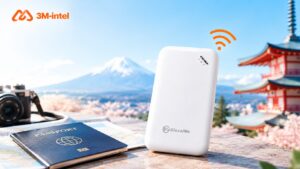
Pocket WiFi is a portable WiFi device.
Put simply, Pocket WiFi works like a miniature WiFi router that you can carry with you.
The device connects to a mobile network through a SIM card or another connectivity technology supported by the provider. It then shares that mobile data connection as WiFi so other devices can access the Internet.
Your smartphone, tablet, or laptop only needs to:
- Find the device’s WiFi network name.
- Enter the password.
- Connect and start using the Internet.
This means users do not need to configure mobile data separately on each device.
Looking for Pocket WiFi to use in Japan?
3Mintel provides WiFi connectivity solutions for travelers, business travelers, and international customers who need Internet access in Japan.
Learn more about 3Mintel’s WiFi services
How Does Pocket WiFi Work?
The way Pocket WiFi works is quite simple.
1. The Device Connects to a Mobile Network
Pocket WiFi receives mobile data in a similar way to a smartphone.
Depending on the device, service plan, and network coverage, it may connect through a 4G or 5G network.
2. Pocket WiFi Creates a Private WiFi Network
Once connected to the mobile network, the device creates its own WiFi network with:
- A network name (SSID)
- A WiFi password
3. Your Phone and Computer Connect to Pocket WiFi
Users simply select the correct WiFi network name and enter the password.
All connected devices then share the Pocket WiFi device’s Internet connection.
This makes Pocket WiFi especially useful when you need Internet access on multiple devices at the same time.
What Are the Benefits of Pocket WiFi?
Easy to Carry While Traveling
Pocket WiFi devices are generally compact and designed for use on the move.
Instead of constantly searching for free WiFi at airports, hotels, train stations, or cafés, users can carry their own Internet connection with them.
Share Internet Access Across Multiple Devices
One of the main advantages of Pocket WiFi is its ability to share a single Internet connection.
Depending on the device, multiple smartphones, tablets, or laptops can connect to one Pocket WiFi device at the same time.
This can be useful for:
- Families traveling together
- Groups of friends
- Business travelers
- Users who need to use a smartphone and laptop at the same time
No Need to Configure Mobile Data on Each Device
Once the Pocket WiFi device is ready to use, other devices can connect to it just like they would connect to WiFi at home.
This is especially convenient for users who do not want to install a separate SIM or eSIM on each device.
More Control Than Public WiFi
Public WiFi may not always be available, and its quality can vary depending on the location.
Pocket WiFi gives users more control over their connection because they do not have to rely on individual public WiFi hotspots.
In addition, a private WiFi network protected by a password generally gives users greater control over access than an open public network. However, standard online security practices should still be followed when using the Internet.
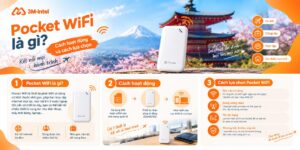
Pocket WiFi gives users more control over their Internet connection because they do not have to rely on individual free WiFi hotspots.
Who Is Pocket WiFi Suitable For?
Pocket WiFi may not be the best option for everyone. However, it can be particularly suitable in the following situations.
Group Travelers
If several people are traveling together and usually stay close to one another, a single Pocket WiFi device can share Internet access with the whole group.
Families with Multiple Devices
Parents’ smartphones, children’s tablets, and laptops can all share the same connection, provided the Pocket WiFi device supports the required number of connected devices.
Business Travelers
Pocket WiFi allows users to connect both a smartphone and a laptop without setting up separate mobile data connections for each device.
Users Who Need Internet on Multiple Devices
If you regularly use a smartphone, tablet, and laptop at the same time, Pocket WiFi can be more convenient than arranging a separate connection for each device.
How Much Does Pocket WiFi Cost?
The cost of using Pocket WiFi does not have a fixed price, as it depends on factors such as:
- Length of use
- Data allowance
- Device type
- Service plan
- Rental or device usage policy
- Additional terms and conditions set by the provider
To find the latest Pocket WiFi plans available, customers should check the most up-to-date information from 3Mintel before registering.
How to Choose the Right Pocket WiFi
Before choosing a Pocket WiFi service, consider the following factors.
Network Coverage
Check which mobile network the service uses and whether coverage is available in the areas you plan to visit.
Actual connection quality may vary depending on:
- Location
- Network conditions
- Surrounding environment
- Device performance
Data Allowance
If you mainly use Google Maps, messaging apps, and basic web browsing, your data needs will be different from those of users who regularly:
- Stream videos
- Join online meetings
- Work remotely
- Upload or download large files
- Share the connection with multiple people
For this reason, it is important to choose a data plan based on your actual usage needs.
Number of Connected Devices
Not all Pocket WiFi devices support the same number of simultaneous connections.
If you are traveling as a group or need to connect several devices, check the connection limit of the device provided.
Battery Life
Because Pocket WiFi is a portable device, battery life directly affects the user experience.
If you expect to be out for most of the day, check:
- Estimated battery life
- Charging port
- Compatibility with portable power banks
4G or 5G
Support for 4G or 5G depends on the Pocket WiFi model and service plan.
You should not choose a device based on 5G support alone. Network coverage, actual usage needs, and available data are also important factors to consider.
Stay Connected More Conveniently with 3Mintel WiFi
3Mintel provides connectivity solutions for international customers in Japan, with services including eSIM, SIM, and WiFi.
For customers who need WiFi access, Pocket WiFi can be a practical option when flexible connectivity is required while traveling, especially when Internet access needs to be shared across multiple devices.
The goal is not simply to choose the device with the most features, but to select the solution that best matches the number of users, number of devices, length of use, and actual data needs.
Frequently Asked Questions About Pocket WiFi
1. What is Pocket WiFi?
Pocket WiFi is a portable WiFi device that uses a mobile network connection and shares that connection as WiFi with other devices.
Put simply, it is a compact WiFi router that you can carry with you while traveling.
2. Can Pocket WiFi Be Used Anywhere?
Not completely.
Pocket WiFi can only access the Internet when the device is within the coverage area of the mobile network used by the service.
Speed and connection stability may also vary depending on location, network conditions, and the surrounding environment.
3. How Does Pocket WiFi Work?
Pocket WiFi connects to a mobile data network and then creates a private WiFi network that smartphones, tablets, laptops, and other compatible devices can use to access the Internet.
4. Can Pocket WiFi Connect Multiple Devices?
Yes. However, the number of devices that can connect at the same time depends on the Pocket WiFi model and service conditions.
If you plan to use it with a family or a larger group, check the device specifications before choosing a service.
5. Is Pocket WiFi Safer Than Public WiFi?
Pocket WiFi allows users to connect through a private, password-protected network instead of directly using an open public WiFi network.
This gives users greater control over their connection. However, it is still important to use a strong password and follow standard online security practices.
6. Are Unlimited Data Plans Available for Pocket WiFi?
This depends on the provider and service plan.
Some plans advertised as “unlimited” may still be subject to fair usage policies or reduced speeds under certain conditions.
For this reason, always check the data allowance, speed limitations, and terms of use before registering.
Looking for the right Pocket WiFi solution for your trip or stay in Japan?
Send a message directly to Global Pocket WiFi for advice based on your usage needs, number of devices, and length of stay.
